Online Search and Evaluation
GO TO SOURCE ANALYSISSearch and evaluation skills are a crucial part of our online lives. The better we become at search, the quicker we can find what we’re looking for. The more we learn how to evaluate the quality of the sites we visit, the less we have to bother with content that isn’t worth our time.
Earning Your Search Badge
To earn your core Search Badge, you’ll need to complete the following work, the details of which are described below:
- Perform a demonstration of a search technique or strategy in class
- Critically analyze three sources using provided guidelines
- Generate a list of at least four high-quality, MLA-formatted sources to support your Research Post
To level-up your Search badge, create a how-to tutorial about your search technique and post it on our class blog.
Search Strategies and Techniques
You’ll be asked to learn about a search strategy or technique available on Google, then demonstrate how it works on our learning blog and in front of class. These tips help us to go beyond a typical search to find relevant results more quickly.
How it Works: The Level-Up How-to Search Post
To demonstrate your strategy or technique on our learning blog:
- Learn about your assigned strategy or technique.
- Determine the steps necessary to perform it.
- Take a screenshot of each step and write a description of the step to go with it, or create a screencast of you performing and describing each step in sequence, and save your materials to Google Drive. Be sure to keep your screenshots separate from your Google Doc so that you can easily add them to your post later.
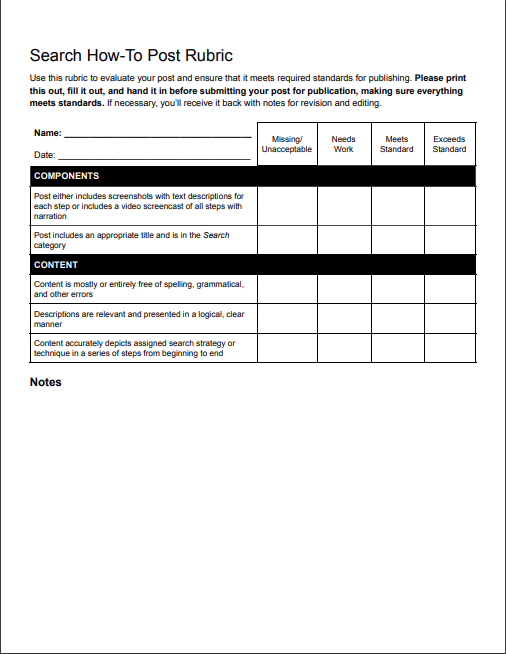
- Create a blog post using your materials that meets all standards contained in the rubric. The post title should be the name of your assigned strategy or technique. For example, “Performing a find within a web page.” No header image is necessary, tags are optional, and the category should be “Search.”
- Fill out and submit the post rubric.
- Submit the post for review online within one week of your in-class demonstration date.
- Revise your post based upon provided feedback if necessary.
How-to Search Post Rubric
How it Works: In-Class Demonstration
To demonstrate your strategy or technique in class:
- Sign up for your presentation day in the order determined. 2–3 demonstrations can be performed in each class.
- On the day that you are assigned to present, come to the front of the class and either perform each step necessary to complete your strategy or technique while explaining the process to us or play a screencast video that you previously created.
- Answer any questions posed by your teacher or classmates.
Note that you can also record your in-class performance as a screencast video for inclusion in your blog post.
List of Search Strategies and Techniques
- Combining searches using Google
- Excluding words from your search using Google
- Finding images, text, and videos that are free to use using Google
- Finding images that feature specific types of colors (full color, black & white, transparent, red, blue, etc.) using Google image search
- Finding numbers within a range using Google
- Finding pages published in a particular country/region using Google
- Finding pages that are similar to a URL using Google
- Finding pages that link to a URL using Google
- Finding results that are of a specific file type (PDF, PowerPoint, Excel, Word, etc.) using Google
- Finding specific types of images (faces, animated, line drawings, photos) using Google image search
- Finding terms in a specific region of a webpage (title, web address, links) using Google
- Finding terms that occur on a single website (like wikipedia.org) or domain (like .edu, .org, or .gov) using Google
- Finding terms that were last updated within a timeframe (the last day, week, month, year, etc.) using Google
- Finding text within a web page
- Searching for an exact phrase using Google
- Searching for unknown words with wildcards using Google
- Searching social media and hashtags using Google
- Using Google’s reverse image search (taking an image that you posses and finding out where it appears online)
Demonstration Schedule
Source Analysis
Virginia Tech’s University libraries have a wonderful list of criteria to consider when evaluating a web site. They have been converted into a Google Spreadsheet for easy access. You’ll use this criteria to evaluate and analyze three sources, then create a report with your findings.
How it Works
REPORT GENERATOR- Choose a topic below, then read all three sources that relate to the topic.
- Using the evaluation criteria above, determine what indicators of quality are present or missing in each source. You don’t have to stay on the article page! Use your search and observation skills to find more information as necessary to help you make your final determination.
- Rank the sources from highest quality to lowest.
- Fill out the Source Analysis Report Google Doc and fill it out.
- Make sure your report is contained within your Digital Citizenship Google Drive folder.
- Notify your teacher via email that the report is ready for review.
Analysis Topics
Cord Cutting (Online Video vs. Cable TV)
Article 1 • Article 2 • Article 3
The Great Pacific Garbage Patch
Article 1 • Article 2 • Article 3
Net Neutrality
Article 1 • Article 2 • Article 3
Nutritional Supplements
Article 1 • Article 2 • Article 3
MLA Sources for Research Project
Each research project posted on the class blog requires a sources section underneath its content. This section should include no fewer than four high-quality sources, and must be MLA formatted. URL’s should also be hyperlinked so that visitors to your post can easily access your chosen sources.
Creating MLA-Formatting Sources
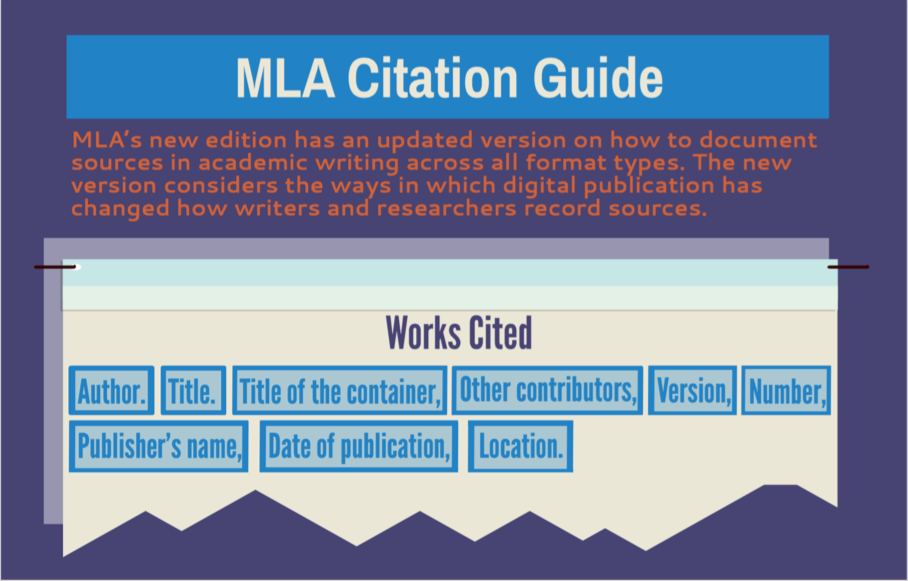
To cite your sources in MLA format, you can use the MLA Citation Guide below, use EasyBib to create your citation (you’ll likely have to deal with advertising), or find another resource. Note that Google’s built-in MLA citation tool does not always work as expected, so you may need to modify its results.
Only sources that meet quality standards as determined by indicators in the criteria above will be accepted.